

10 வருஷ experience. மறுபடியும் fresher-ஆ?
AI வந்ததும் மறுபடியும் fresher மாதிரி feel ஆகுதா? இது உங்களுக்குத்தான். A 4-hour hands-on Claude Code workshop, 2 hours each day, in Tamil, for software engineers who were told “use AI” and given zero training. You build a real feature with Claude Code on your own laptop. You catch its mistakes. You leave with a clear 30-day plan. Boring theory இல்ல. உங்க கை keyboard-ல தான் இருக்கும்.
அருண் குமார் live-ஆ, தமிழ்ல சொல்லித் தருவார். Ex-Dassault Systèmes (BMW and Airbus projects), startup CTO, founder of Maxwize. Claude Code drives close to 100% of his code.
- Sat, 31 Oct and Sun, 1 Nov 2026
- Online on Zoom
- Limited seats மட்டும்
வணக்கம், நான் அருண் குமார்.
Arun Kumar has written software for more than 10 years and codes with Claude every single day.
- 3.5 yearsDassault Systèmes3DEXPERIENCE platform applications used in production by BMW and Airbus for manufacturing planning. Enterprise scale, regulated industries, global teams.
- 4 yearsEngineering lead and de facto CTO, Accelerate MedicineBuilt the US life-sciences startup’s entire pharma intelligence platform from day one: data pipelines, backend, frontend, infrastructure.
- TodayFounder, MaxwizeCustom software and implementation for 15+ brands across Shopify, Zoho and Webflow.
- Every dayClaude-nativeClaude Code is his primary development environment for close to 100% of new code. He ships production features 3 to 5 times faster than two years ago, and he shows you exactly how.
Coding சில வருஷத்துக்கு ஒரு தடவை மாறும். ஆனா இந்த தடவை? ரொம்ப ரொம்ப fast-ஆ மாறுது. ஆனா நீங்க AI scientist ஆகணும்னு அவசியமே இல்ல. Claude-ஐ உங்க junior developer-ஆ மாத்த தெரிஞ்சா போதும். செம fast-ஆ வேலை செய்யும், தூங்கவே தூங்காது… சில நேரம் full confidence-ஓட பொய்யும் சொல்லும்.
Coding changes every few years. This time it is changing super fast. But you do not need to become an AI scientist. You need to turn Claude into your junior developer. One who is super fast, never sleeps, and sometimes lies with full confidence.
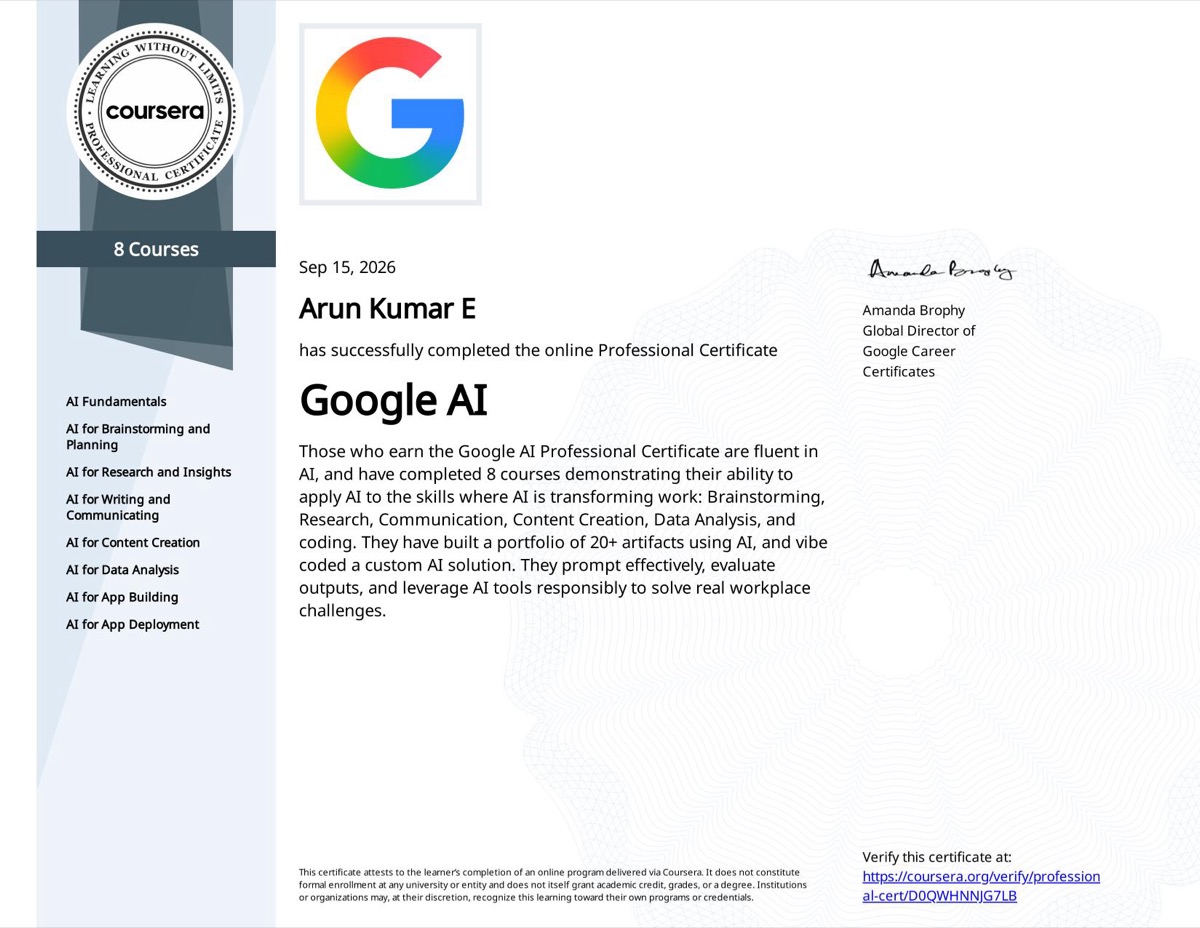
Google AI certified
Arun holds the Google AI Professional Certificate, 8 courses on applying AI to planning, research, writing, data analysis, app building and deployment, completed in September 2026.
The eight courses
- AI Fundamentals
- Brainstorming and Planning
- Research and Insights
- Writing and Communicating
- Content Creation
- Data Analysis
- App Building
- App Deployment
Certificate-அ click பண்ணி பாருங்க, அல்லது Coursera-ல verify பண்ணுங்க.
இது உங்களுக்குத்தான்.
This workshop is for you if…
AI makes you feel like a fresher again
5 வருஷம், 10 வருஷம், 15 வருஷம் கூட code பண்ணிருப்பீங்க. ஆனா இப்போ AI வந்ததும் மறுபடியும் fresher மாதிரி feel ஆகுதா?
You have coded for 3 to 15 years, and suddenly the ground moved.
Your manager said "use AI, go faster"
“AI use பண்ணு. சீக்கிரம் முடி.” ஆனா training? Zero. ஒண்ணுமே இல்ல.
And gave you no training, no workflow and no time to learn one.
You tried an AI tool and went back
திங்கக்கிழமை: புது AI tool. புதன்கிழமை: திரும்ப Stack Overflow-ல.
You got something half-working, lost trust, and returned to Stack Overflow.
You want to know what to learn next
AI videos பாக்குறத நிறுத்துங்க. அடுத்து என்ன கத்துக்கணும்னு தெளிவா தெரிஞ்சுக்குங்க.
Not another AI video. A plan you can act on from Monday.
4 மணி நேரத்துல என்ன நடக்கும்?
Everyone brings a laptop. Everyone builds. Arun codes live on screen, then you do the same on yours. Everything runs on Claude: the Claude app for thinking and specs, Claude Code in your terminal for building.
- Day 1 · Hour 1
Claude, the way Arun uses it every day
Claude-ஐ அருண் தினமும் எப்படி use பண்றார்னு அப்படியே காட்டுறார். எத எப்போ use பண்ணணும்னு.
Which Claude surface to open for which job. Then the one lesson that changes everything: how to brief Claude Code like you would brief a junior developer, with context, constraints and a definition of done. You run /init on a real codebase, set up CLAUDE.md, and learn plan mode and the eight commands you will use daily.
- /init
- CLAUDE.md
- Plan mode
- 8 daily commands
- Day 1 · Hour 2
You build a real feature with Claude Code
நீங்களே Claude Code-ஓட ஒரு real feature build பண்ணுவீங்க. Live-ஆ. உங்க laptop-லயே.
Clone the starter repo. Arun builds a feature end to end, narrating every decision. Then you build the same feature on your own laptop: explore, plan, build, verify, commit. You leave this hour with a commit on your own GitHub.
- Explore
- Plan
- Build
- Verify
- Commit
- Day 2 · Hour 3
Catch Claude's mistakes
Claude பண்ற தப்புகளை பிடிக்கிறது. Bugs. Security ஓட்டைகள். உண்மை மாதிரியே தெரியுற fake functions.
A codebase with ten planted AI mistakes. Fake functions that look real. Tests that pass but test nothing. Security holes. Hallucinated packages. You hunt in pairs, then Arun walks through every one and gives you the one-page review checklist you will use on Monday. You also see how Claude reviews its own work, and how a hook can block a bad commit.
- 10 planted bugs
- Review checklist
- Self-review
- Commit hooks
- Day 2 · Hour 4
Where Claude is going, and your 30-day plan
Future. எந்த skills-க்கு மதிப்பு கூடும், நீங்க எங்க இருக்கீங்க, உங்களுக்கான 30 நாள் plan.
Subagents working in parallel. Claude Code talking to a database through MCP. Claude in Chrome driving a web page. Which skills are getting more valuable, and where you sit. Then you write your own 30-day plan, week by week, before you leave the room.
- Subagents
- MCP
- Claude in Chrome
- 30-day plan
கையோட என்ன எடுத்துட்டு போவீங்க?
Confuse-ஆ உள்ள வருவீங்க. ஒரு clear plan-ஓடவும், நீங்களே build பண்ண code-ஓடவும் வெளிய போவீங்க. What you walk out with:
- A feature you built with Claude Code, committed on your own GitHub
- The starter repo and the bug-hunt repo, with answers, to practise again
- The AI code review checklist, one page, ten lines
- Claude Code command card, and the prompt ingredients card
- A CLAUDE.md template, you can drop into any codebase
- Your own 30-day plan, filled in during the session
- Certificate of completion
- WhatsApp community, and one live follow-up Q&A call two weeks later
- Session recording, for this online batch
முன்னாடியே ready பண்ணி வைக்க வேண்டியது
What you need to bring and set up. This is a hands-on session; you cannot follow along without these. Setup instructions and a 2-minute check video reach you 3 days before.
Laptop
Mac, Windows 10/11 or Linux. 8 GB RAM minimum, 16 GB recommended. Keep your charger nearby.
Claude account, Pro plan or higher
A Claude.ai account on the Pro plan ($20/month) at minimum. Claude Code runs on your subscription; the free plan does not include it. Sign up at claude.ai before the session.
Claude Code installed and logged in
Install from claude.ai/code, open a terminal, run claude and log in with your Claude account. If it answers "hello", you are ready.
Claude desktop app
Download from claude.ai/download and log in.
Git and a GitHub account
Git installed, able to clone and push. Your feature gets committed to your own GitHub.
Node.js 18 or newer
For the starter repo. Python 3.10+ if you choose the Python track.
VS Code (optional)
With the Claude Code extension, if you prefer not to live in the terminal.
Basic terminal comfort
You can cd, ls and run npm install.
Stable internet
Everything talks to Claude. Keep your phone hotspot as backup.
Not sure if you are set up? Reply to the setup email with a screenshot of claude answering “hello” and we will confirm.
எப்போ, எங்க, எவ்வளவு?
Date, place and price.
- Date
- Saturday, 31 October · 2 hoursSunday, 1 November · 2 hoursSession times reach you by email.
- Where
- Online on Zoom
- Seats
- Limited seats onlyBatch-அ சின்னதா வச்சிருக்கோம். அப்போதான் ஒவ்வொருத்தருக்கும் அருண் help பண்ண முடியும்.
- Price
₹3,999₹1,999- Not included
- Your Claude Pro subscription$20/month, paid directly to Anthropic
- Language
- TamilSpoken Tamil with English tech terms
Claude and Claude Code are products of Anthropic. Maxwize is not affiliated with Anthropic.
அடிக்கடி கேட்கிற கேள்விகள்
Questions people ask.
Do I really need the Claude Pro plan?
Yes. Claude Code runs on your Claude subscription, and the free plan does not include it. Pro is $20/month and you can cancel after the workshop. If you already use Claude heavily, the Max plan gives you more usage during the session.
Will I run out of Claude usage during the 4 hours?
Pro has a usage limit that resets every few hours. We keep prompts tight and use the right model for the job, so most people are fine. If you hit the limit, you pair up with another participant for the rest of that hour.
I've never used Claude Code. Is that a problem?
No. That is the point. You get a setup email 3 days before with install steps and a 2-minute check video. Hour 1 starts from zero.
Why only Claude? What about other AI coding tools?
Because this is how Arun actually works, every day, and 4 hours is enough to get good at one tool, not three. The workflow you learn transfers to any agent, but you learn it properly on Claude Code.
Which languages and frameworks?
The starter repo is in Node/Express and React, with a Python/FastAPI version available. The workflow is the same in any language, and that workflow is what you are learning.
I'm a senior engineer or architect. Is this too basic?
Hour 1 might be familiar. Hours 2 to 4 are not. Hour 3, catching Claude’s mistakes, is the part most senior engineers come for.
Will this get me a raise or a new job?
We do not promise that. We promise you will ship a feature with Claude Code during the session, know how to check its work, and have a plan for the next 30 days.
Is this a Tamil or English session?
This batch is in spoken tamil with english tech terms. Separate batches run for each language.
When is the session?
Sat, 31 Oct and Sun, 1 Nov 2026, 2 hours each day. Session times and the Zoom link reach you by email, with the setup steps 3 days before.
Can my company pay for a group?
Yes. Email [email protected] for team batches of 10 or more, delivered at your office or online.
So, deal இதுதான்.
4 மணி நேரம். Sat, 31 Oct and Sun, 1 Nov 2026. Online. Batch-அ சின்னதா வச்சிருக்கோம், அப்போதான் ஒவ்வொருத்தருக்கும் அருண் help பண்ண முடியும். உங்க teammate book பண்றதுக்கு முன்னாடி, நீங்க உங்க seat-அ book பண்ணுங்க.
Can't make it? Full refund up to 48 hours before the session, or move to the next batch free.